
Aller au contenu principal
Suchen Sie etwas anderes?
Scenario details:
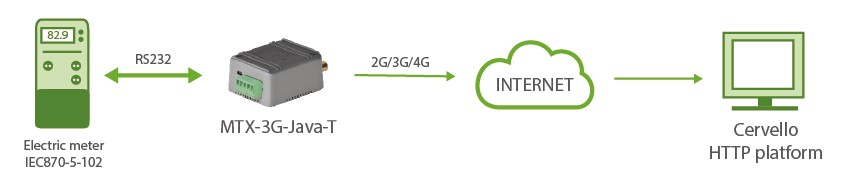
- An energy efficiency company needs to monitor in real time (every 15 minutes) the data of Active Absolute Energy (VabA), Inductive Reactive Absolute Energy (VabRi), Capacitive Reactive Absolute Energy (VabRc) of 1 meter with IEC 870-5-102 protocol with RS232 port and send the data to an HTTP platform
- The meter is in a location where coverage is not very good and connectivity is sometimes lost, so the modem must store the readings in its internal memory to send them when coverage returns. The modem must support 4G/3G/2G technologies
Solution: MTX-Tunnel firmware + MTX-T
Configuration file config.txt (master):
| Configuration | Observations |
| COMM2_baudrate: 9600 COMM2_bitsperchar: 8 COMM2_autorts: off COMM2_autocts: off COMM2_stopbits: 1 COMM2_parity: none GPRS_apn: movistar.es GPRS_login: MOVISTAR GPRS_password: MOVISTAR GPRS_mode: 2g MTX_PIN: 0000 MTX_mode: none MTX_model: 199801445 MTX_ping: 35 MTX_pingIP: 8.8.8.8 MTX_TPServer: 1.europe.pool.ntp.org MTX_TPServer: 2.europe.pool.ntp.org MTX_TPProtocol: ntp MTX_TPFormat: unix MTX_porAux: iec102 MTX_invertedCom: on SMS_allPhones: on SMS_sendIP: off SMS_ATEnabled: on SMS_ATResponse: on IEC102_meter1: id001;1715;1;7 IEC102_period: 15 LOGGER_enabled: on LOGGER_password: ID-12345678 LOGGER_server: www.miweb.es/set.asp?data= LOGGER_registerSize: 600 LOGGER_numRegistersFlash: 1500 LOGGER_mode: mqtt LOGGER_httpMode: getjson |
Speed of serial port Data bit No flux control No flux control Stop bits Bit parity APN GPRS provided by the GSM operator GPRS Login GPRS Password Modem is always GPRS connected Pin of the SIM GPRS connection server type Modem model Ping time to oversee connection Google IP (f.e.) to ping Time server Time server backup NTP protocol Time format Auxiliar port has function IEC102 Inverted port on Send SMS with commands from any phone Modem doesn\’t respond to a missed call/SMS Commands can be sent to the MTX by SMS MTX responds with an SMS to a command SMS Identifier id001, address 1715, pt. 1, password 7 Period to read counter Logger on to store readings User field Web platform url Internal registry size Max. number of registries Sending mode via MQTT Mode used |
Details:
- The data is sent to the HTTP server using a JSON object, which has the following example format:
{“IMEI”:”353085090011697”,”TYPE”:”IEC102”,”TS”:”2020-05-15T18:00:05Z”,”P”:”ID-12345678”,”ID”:”ID001”,”VABA”:61245,”VINA”:614,”VABRI”:512}Where:
– IMEI: IMEI of the modem (unique identifier of the MTX modem)
– TYPE: Indicates the type of frame. In this case IEC102
– TS: Timestamp of when the data was read
– P: User field
– ID: User identifier indicated in IEC102_meter1
– VBAB: Active absolute energy (VabA)
– VINA: Absolute Reactive Inductive Energy (VabRi)
– VABRI: Absolute Reactive Capacitive Energy (VabRc) - Remember that the configuration data of the RS232 serial port of the modem must match the configuration of the RS232 port of the meter.
- If you need to monitor other meter parameters in addition to VabA, VabRi, VabRc, check the possibility at iotsupport@mtxm2m.com.
- The IEC102_ configuration parameters are only available in the “MTX-Tunnel IEC870”, it is a product that is supplied separately.






