
Suchen Sie etwas anderes?
Table of Contents
Configure

Reset router settings: Click the Yes button to reset all configuration settings to their default values. Then click the Apply Settings button.
NOTE: Any settings you have saved will be lost when the default settings are restored. After restoring the router is accessible under the default IP address 192.168.1.1 and the default password admin.
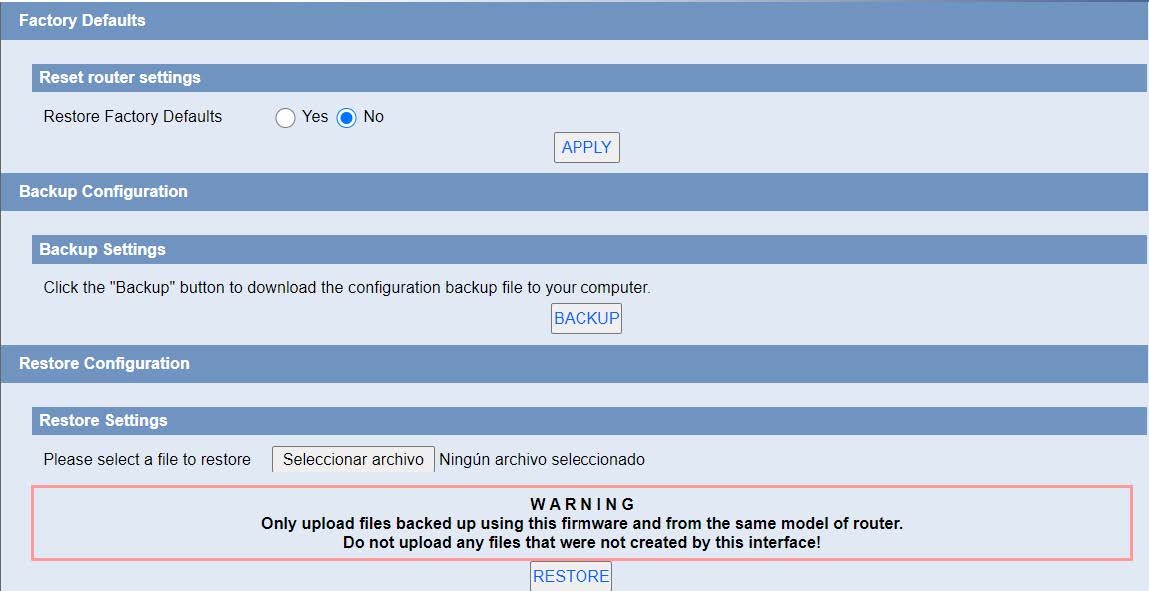
Backup Settings: You may backup your current configuration in case you need to reset the router back to its factory default settings.Click the Backup button to backup your current configuration.
Restore Settings: Click the Browse button to browse for a configuration file that is currently saved on your PC.Click the Restore button to overwrite all current configurations with the ones in the configuration file.
NOTE: Only restore configurations with files backed up using the same firmware and the same model of router.


Les accès par défaut sont :
Saisir le mode de connexion « Ethernet » ou « modem » :
Dans le cas d’une configuration par Ethernet, veiller à ce que les paramètres IP soient compatibles avec l’accès au serveur d’après la configuration du réseau local du concentrateur. Dans le cas d’une connexion par Ethernet, la configuration doit être compatible avec la topologie du réseau local du concentrateur afin qu’il puisse accéder aux serveurs. Cette configuration se fait via la page de configuration « Networks » (voir chapitre 3.2.2.3 : « Réseaux (Networks) »).
Dans le cas d’une connexion par modem, la configuration du modem doit être correcte avant de pouvoir effectuer une connexion. Cette configuration se fait dans la page de configuration « Modem » (voir chapitre 3.2.2.4 : « Modem »).
Les paramètres des serveurs à configurer au minimum sont les suivants :
Il faut donc configurer les champs : « Interface », « Type », « Server type », « Address », « Port », « Login » et « Password ».
Les autres champs peuvent être laissés aux valeurs par défaut à condition que les répertoires aient été créés correctement auparavant. Voir chapitre 3.1.2 : « Fichiers de configuration » pour plus de détails.


Attendre. Le concentrateur va redémarrer avec sa configuration usine.






