
Aller au contenu principal
Suchen Sie etwas anderes?
The MTX-Router-Titan and MTX-Router-Titan mini can act as an OpenVPN client. By using a VPN service, all devices connected to the router’s Ethernet bus or the IP-RS232/485/USB gateways can be securely accessed from the othe rend of the VPN network. A VPN service is also useful to avoid problems generated from the use of proxies, firewalls, etc. and especially when using SIM cards that use IP addresses in the range 10.x.x.x.
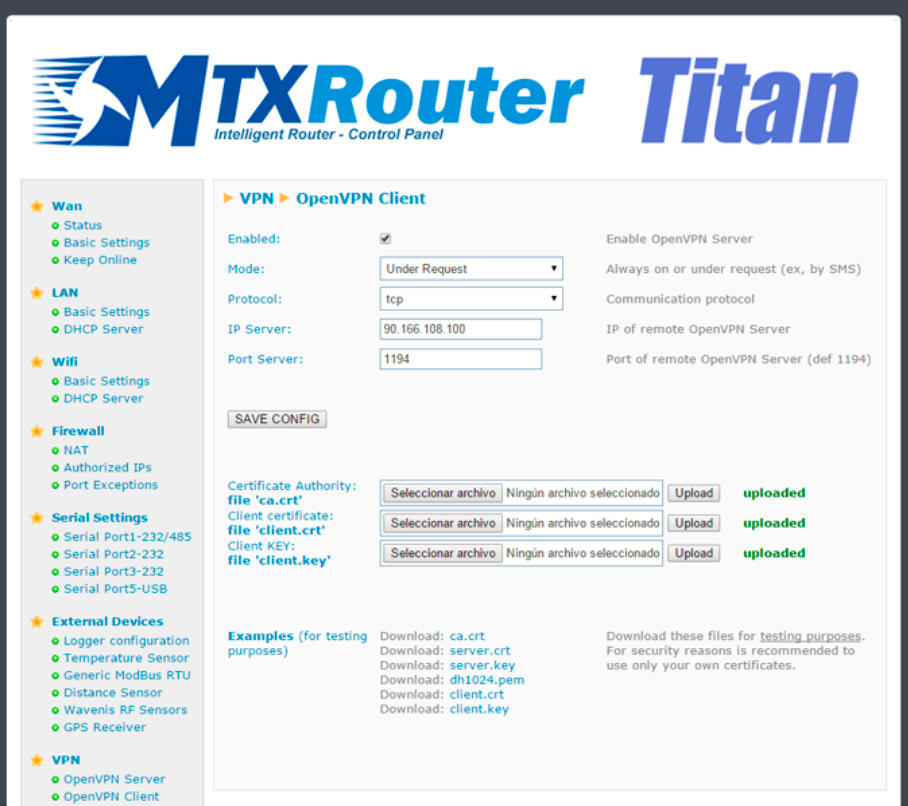
- Enabled: select this box if we wish to activate the OpenVN service in Client mode
- Mode: this option allows we to establish the connection mode for the VPN service. “Always On” will keep the VPN active at all times. “Under Request” will activate the VPN for the time we require. This option could be used in times of maintenance for example. If used, to activate the VPN service we will need to send an AT command via SMS, Telnet, Webserver, SNMP or Modbus TCP. Once the time configured for an active service has passed, the VPN will be disconnected
- Protocol: this option allows we to establish the protocol for the activation of the VPN service. Either UDP or TCP can be used
- Port: the standard port is 1194 but we can change this in this field
- IP server: indicate the public IP address of the remote server that will act as the OpenVPN server
- Necessary files for OpenVPN
- In order to be able to use the MTX-Router-Titan devices as an OpenVPN client, we will need to create and update the following files: ca.crt (certificate of authenticity), client.crt (server certificate) and client.key (server private key)
Towards the bottom of the screen we will see that we can download example files. These must only be used in test mode. In real applications we should always generate our own certificates.
ADDITIONAL NOTES
- Once the configuration is complete, press the “SAVE CONFIG” button to save the changes. Remember that the router should be reset in order for the changes to take effect.






