Suchen Sie etwas anderes?
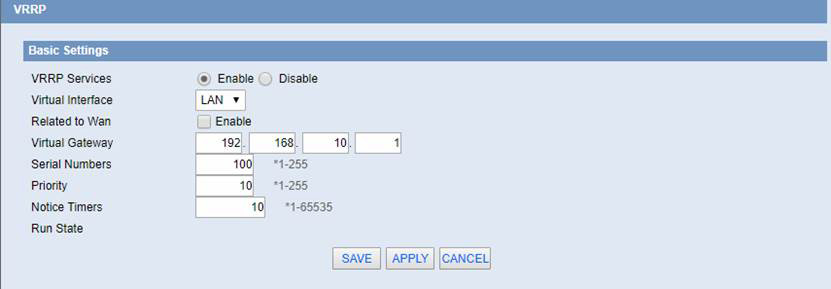
VRRP
Virtual Interface: The binding runtime interface.
Related to Wan: When the WAN port linkage work is enabled, when the WAN port is unable to access the internet, the VRRP status value shows Down, and automatically quits the VRRP backup group. The remaining VRRP routers run for Master router router.
Virtual Gateway: The default gateway address for external communication.
Serial Numbers: The MAC address of the client who is currently logged in to the WEB management page, click the button, and fill the MAC address of the PC that can get the current management device into the MAC address of the cloned WAN port.
Priority: The higher priority is master.
Notice Timers: If the backup machine does not receive advertisement messages from the host every X seconds, a new round of elections will take place.
Run State: Displays whether the current router is in standby or host state.


Les accès par défaut sont :
Saisir le mode de connexion « Ethernet » ou « modem » :
Dans le cas d’une configuration par Ethernet, veiller à ce que les paramètres IP soient compatibles avec l’accès au serveur d’après la configuration du réseau local du concentrateur. Dans le cas d’une connexion par Ethernet, la configuration doit être compatible avec la topologie du réseau local du concentrateur afin qu’il puisse accéder aux serveurs. Cette configuration se fait via la page de configuration « Networks » (voir chapitre 3.2.2.3 : « Réseaux (Networks) »).
Dans le cas d’une connexion par modem, la configuration du modem doit être correcte avant de pouvoir effectuer une connexion. Cette configuration se fait dans la page de configuration « Modem » (voir chapitre 3.2.2.4 : « Modem »).
Les paramètres des serveurs à configurer au minimum sont les suivants :
Il faut donc configurer les champs : « Interface », « Type », « Server type », « Address », « Port », « Login » et « Password ».
Les autres champs peuvent être laissés aux valeurs par défaut à condition que les répertoires aient été créés correctement auparavant. Voir chapitre 3.1.2 : « Fichiers de configuration » pour plus de détails.


Attendre. Le concentrateur va redémarrer avec sa configuration usine.