
Aller au contenu principal
Suchen Sie etwas anderes?
Details of the example scenario:
- We have a device with an Ethernet port which we want to provide with Internet access to send data to the Cloud. The device does not have a fixed LAN IP address, therefore we want to use DHCP in the Ethernet port
- We need to be able to access the router’s configuration remotely via the standard TCP port 80
- The router will be listening in the TCP port 20010 to create a transparent 3G-RS232 gateway and to be able to remotely access the device via the serial port RS232 with the configuration
115200,8,N,1
Solution: MTX-Router-Titan mini
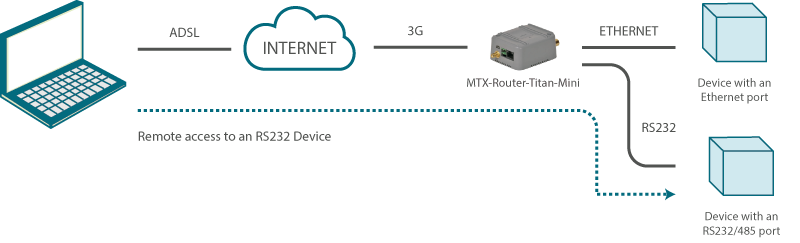
Configuration example ready for use:
We can easily load the example from the router’s web configuration environment from the menu “Other>Backup/Examples”.
Details:
- After the configuration is loaded in our router, we can access the router’s configuration with the default username and password: “admin” and “admin”, and the IP address“192.168.1.2”
- Check the configuration in the menus “Wan>Basic Settings”, “LAN>DHCP”, “Serial Settings>Serial Port 1”
- With the 3G-RS232 gateway, everything that is sent to the router’s TCP port 20010 will be redirected to the device’s serial port RS232 and vice versa
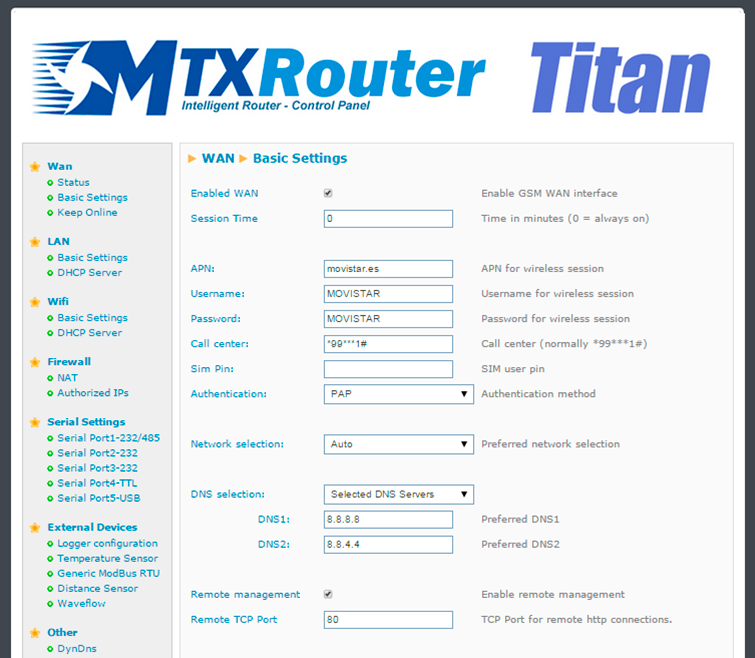
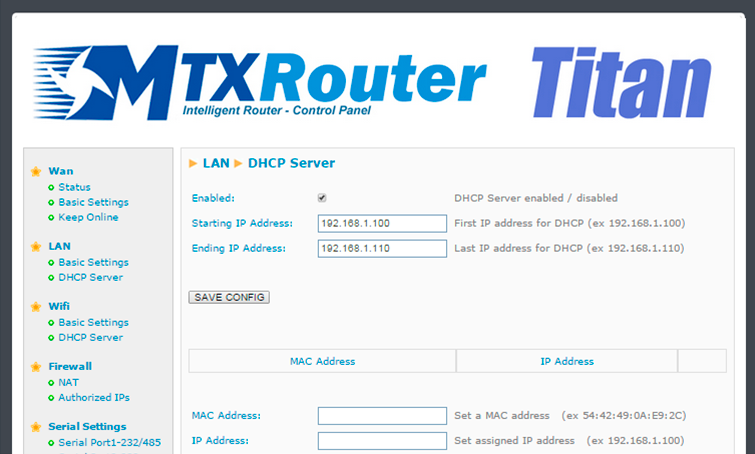
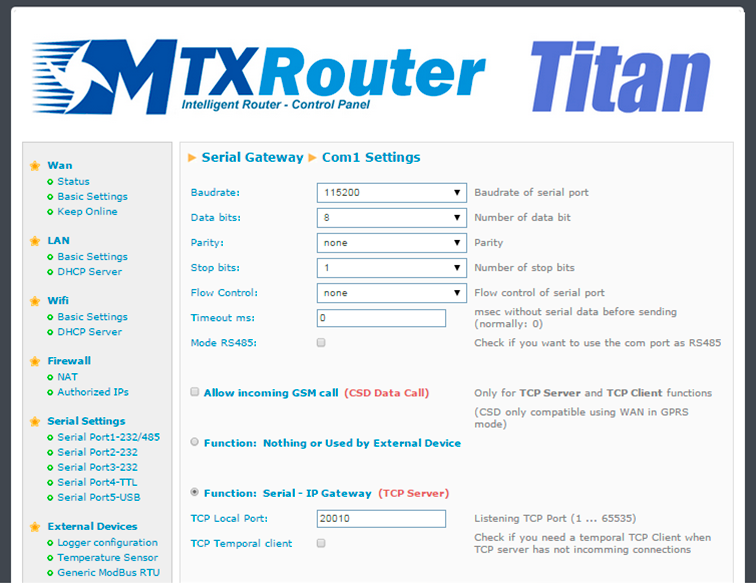

Les accès par défaut sont :
Saisir le mode de connexion « Ethernet » ou « modem » :
Dans le cas d’une configuration par Ethernet, veiller à ce que les paramètres IP soient compatibles avec l’accès au serveur d’après la configuration du réseau local du concentrateur. Dans le cas d’une connexion par Ethernet, la configuration doit être compatible avec la topologie du réseau local du concentrateur afin qu’il puisse accéder aux serveurs. Cette configuration se fait via la page de configuration « Networks » (voir chapitre 3.2.2.3 : « Réseaux (Networks) »).
Dans le cas d’une connexion par modem, la configuration du modem doit être correcte avant de pouvoir effectuer une connexion. Cette configuration se fait dans la page de configuration « Modem » (voir chapitre 3.2.2.4 : « Modem »).
Les paramètres des serveurs à configurer au minimum sont les suivants :
Il faut donc configurer les champs : « Interface », « Type », « Server type », « Address », « Port », « Login » et « Password ».
Les autres champs peuvent être laissés aux valeurs par défaut à condition que les répertoires aient été créés correctement auparavant. Voir chapitre 3.1.2 : « Fichiers de configuration » pour plus de détails.


Attendre. Le concentrateur va redémarrer avec sa configuration usine.







