
Suchen Sie etwas anderes?
Table of Contents
DDNS
If user’s network has a permanently assigned IP address, users can register a domain name and have that name linked with their IP address by public Domain Name Servers (DNS). However, if their Internet account uses a dynamically assigned IP address, users will not know in advance what their IP address will be, and the address can change frequently. In this case, users can use a commercial dynamic DNS service, which allows them to register their domain to their IP address, and will forward traffic directed at their domain to their frequently-changing IP address.
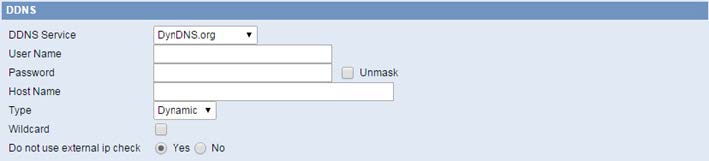
User Name: Users register in DDNS server, up to 64 characteristic.
Password: Password for the user name that users register in DDNS server, up to 32 characteristic.
Host Name: Users register in DDNS server, no limited for input characteristic for now.
Type: Depends on the server.
Wildcard: Support wildcard or not, the default is OFF. ON means *.host.3322.org is equal to host.3322.org.
Do not use external ip check: Enable or disable the function of ‘do not use external ip check.

Force Update Interval: Unit is day, try forcing the update dynamic DNS to the server by settled days.

DDNS Status shows connection log information.






