
Aller au contenu principal
Suchen Sie etwas anderes?
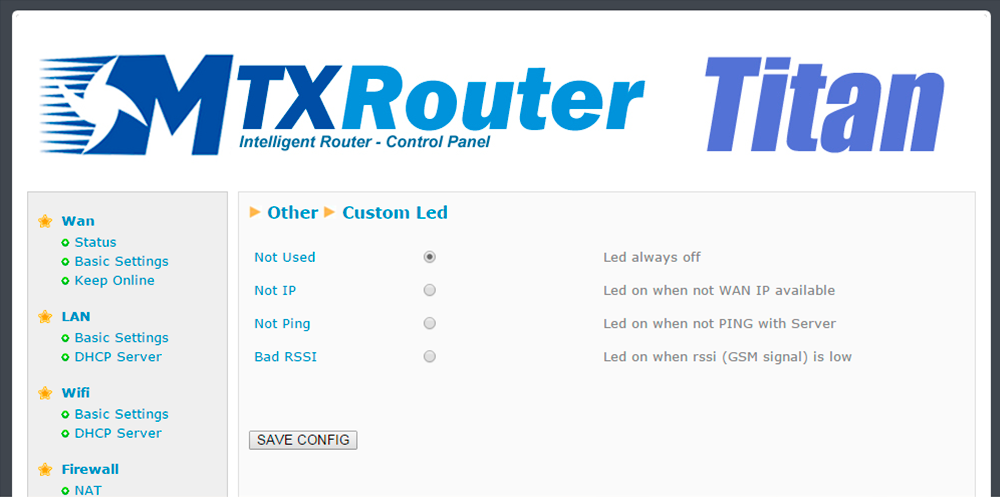
Both the MTX-Router-Titan II, MTX-Router-Titan and MTX-Router-Titan mini devices have a red LED which can be configured. In this section we can specify how it is to be used according to our needs.
- Not used: the LED will always be switched off, without use
- Not IP: the red LED will light up whenever the router does not have an assigned WAN IP address
- Not ping: the red LED will light up whenever the router does not receive a response to a PING configured in the “WAN” section (the ping that checks connectivity)
- Bad RSSI: the red LED will light up when the network coverage is weak, providing a sign that it would be better to move the antenna or use a higher poour
ADDITIONAL NOTES
- Once the configuration is finished, click “SAVE CONFIG” to save the changes. Remember that the router should be restarted for the changes to take effect

Les accès par défaut sont :
Saisir le mode de connexion « Ethernet » ou « modem » :
Dans le cas d’une configuration par Ethernet, veiller à ce que les paramètres IP soient compatibles avec l’accès au serveur d’après la configuration du réseau local du concentrateur. Dans le cas d’une connexion par Ethernet, la configuration doit être compatible avec la topologie du réseau local du concentrateur afin qu’il puisse accéder aux serveurs. Cette configuration se fait via la page de configuration « Networks » (voir chapitre 3.2.2.3 : « Réseaux (Networks) »).
Dans le cas d’une connexion par modem, la configuration du modem doit être correcte avant de pouvoir effectuer une connexion. Cette configuration se fait dans la page de configuration « Modem » (voir chapitre 3.2.2.4 : « Modem »).
Les paramètres des serveurs à configurer au minimum sont les suivants :
Il faut donc configurer les champs : « Interface », « Type », « Server type », « Address », « Port », « Login » et « Password ».
Les autres champs peuvent être laissés aux valeurs par défaut à condition que les répertoires aient été créés correctement auparavant. Voir chapitre 3.1.2 : « Fichiers de configuration » pour plus de détails.


Attendre. Le concentrateur va redémarrer avec sa configuration usine.







