Zum Hauptinhalt springen
Suchen Sie etwas anderes?
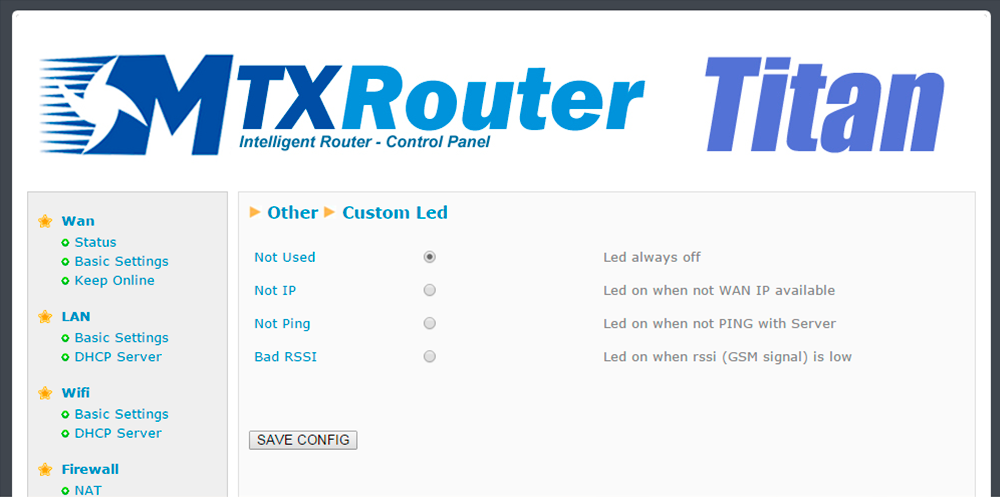
Both the MTX-Router-Titan II, MTX-Router-Titan and MTX-Router-Titan mini devices have a red LED which can be configured. In this section we can specify how it is to be used according to our needs.
- Not used: the LED will always be switched off, without use
- Not IP: the red LED will light up whenever the router does not have an assigned WAN IP address
- Not ping: the red LED will light up whenever the router does not receive a response to a PING configured in the “WAN” section (the ping that checks connectivity)
- Bad RSSI: the red LED will light up when the network coverage is weak, providing a sign that it would be better to move the antenna or use a higher poour
ADDITIONAL NOTES
- Once the configuration is finished, click “SAVE CONFIG” to save the changes. Remember that the router should be restarted for the changes to take effect

Geben Sie den Verbindungsmodus „ethernet“ oder „modem“ ein:
Stellen Sie bei einer Ethernet-Konfiguration sicher, dass die IP-Parameter mit dem Serverzugriff entsprechend der lokalen Netzwerkkonfiguration des Hubs kompatibel sind. Bei einer Ethernet-Verbindung muss die Konfiguration mit der lokalen Netztopologie des Hubs kompatibel sein, damit dieser auf die Server zugreifen kann. Diese Konfiguration erfolgt über die Konfigurationsseite „Networks“ (siehe Kapitel 3.2.2.3: „Netzwerke (Networks)“).
Bei einer Modemverbindung muss das Modem korrekt konfiguriert sein, bevor eine Verbindung hergestellt werden kann. Diese Konfiguration erfolgt auf der Konfigurationsseite „Modem“ (siehe Kapitel 3.2.2.4: „Modem“).
Die minimal zu konfigurierenden Serverparameter sind folgende:
Diese Felder müssen konfiguriert werden: „Interface“, „Type“, „Server type“, „Address“, „Port“, „Login“ und „Password“.
In den übrigen Feldern können die Standardwerte beibehalten werden, solange die Verzeichnisse zuvor korrekt angelegt wurden. Weitere Einzelheiten siehe Kapitel 3.1.2: „Konfigurationsdateien“.

Warten Sie. Der Hub startet nach ein paar Augenblicken mit der Werkseinstellung neu.