
Aller au contenu principal
Suchen Sie etwas anderes?
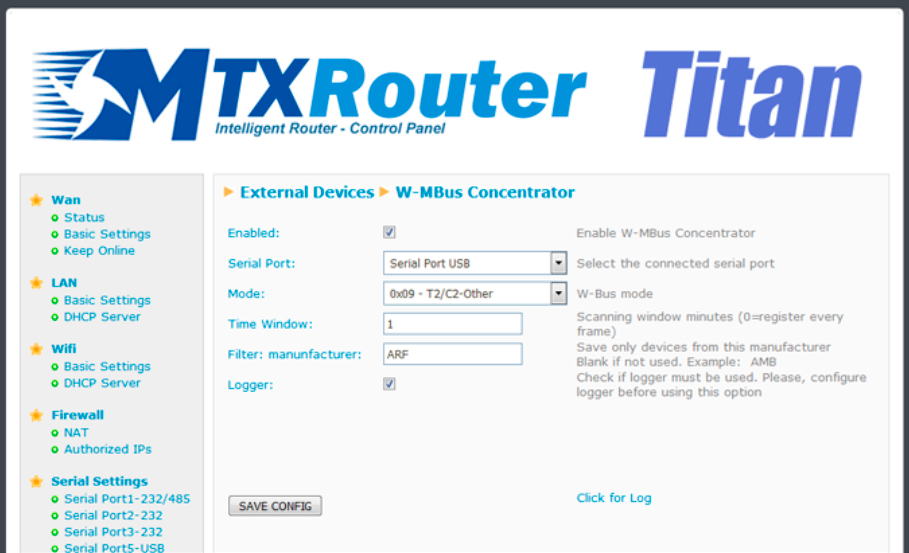
From this section we can configure the Titan router as a W-MBus hub, to collect data from W-MBus devices, pack them and send them to a web platform. Remember that our Titan router must have the RF card (optional) in order to use this feature.
It has a very detailed application note with examples of use, consult it for more information: AN21-RouterTitan-Wireless-MBus-Concentrator.pdf.
- Enabled: check this box to activate the “W-Mbus Concentrator of the Titan Router” feature
- Serial Port: select the serial port of the Titan router where the RF card (optional) is connected inside our Titan rotuer. Normally we must select “Serial Port USB”
- Mode: choose the W-MBus mode we need to use
- Time Window: indicates a temporary window (in minutes). Only one W-MBus data frame of each device received during said time window will be recorded
- Filter manufacturer: optional. It allows to introduce a manufacturer to receive only the data of equipment of this manufacturer. For example AMB, ARF…
- Logger: check this box if we want to save the W-MBus data to the internal logger for later upload to our Web platform via HTTP or FTP
ADDITIONAL NOTES
- Once the configuration is finished, press the “SAVE CONFIG” button to save the changes. Remember to restart our router for the new changes to take effect






