
Aller au contenu principal
Suchen Sie etwas anderes?
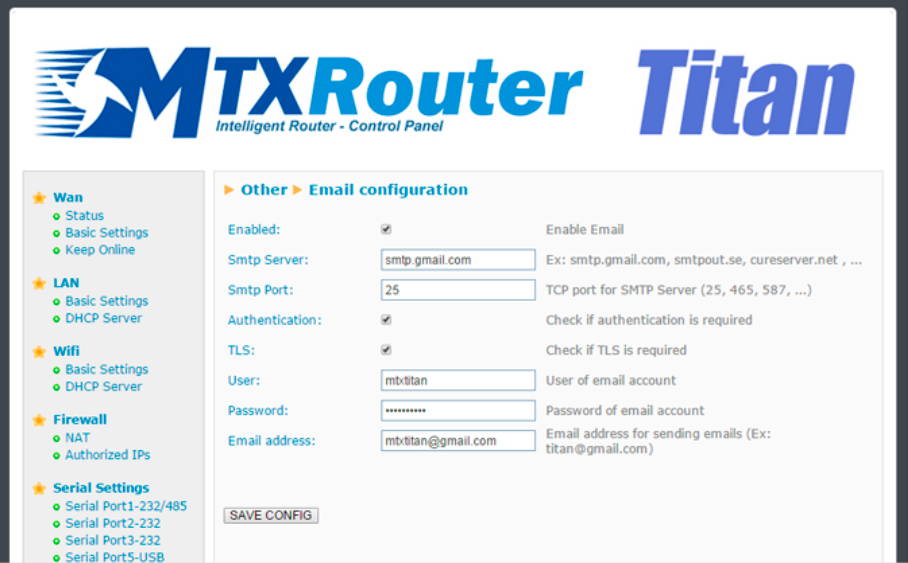
Titan routers are able to send email notifications. They also allow emails to be sent using AT commands. For example, if we have a PLC and wish to send an SMS or email, we can send an AT command to the MTX-Router-Titan-3G device to do it.
The router must be configured beforehand to be able to receive emails:
- Enabled: select this box if we wish to activate this option
- Smtp server: Indicate the address or DNS or the SMTP server (for example, smtp.gmail.com, smtpout.secureserver.net, etc.)
- Smtp Port: TCP port of the SMTP server
- Authentication: select this box if the SMTP server requires authentication (usually the case)
- TLS: select this box if the SMTP server requires TLS
- User: username of the sender’s email account
- Password: password of the sender’s email account
- Email address: sender’s email from which emails are sent
ADDITIONAL NOTES
- Once the configuration is complete, press the “SAVE CONFIG” button to save the changes. Remember that the router should be reset in order for the changes to take effect.
- If we use a Gmail SMTP server, we may have to activate certain configurations in our account in order to be able to send emails from an IOT device. To do this:
- 1. Activate the option: http://www.google.com/settings/security/lesssecureapps
- 2. Activate: http://www.google.com/accounts/DisplayUnlockCaptcha






