Zum Hauptinhalt springen
Suchen Sie etwas anderes?
Titan routers are able to send email notifications. They also allow emails to be sent using AT commands. For example, if we have a PLC and wish to send an SMS or email, we can send an AT command to the MTX-Router-Titan-3G device to do it.
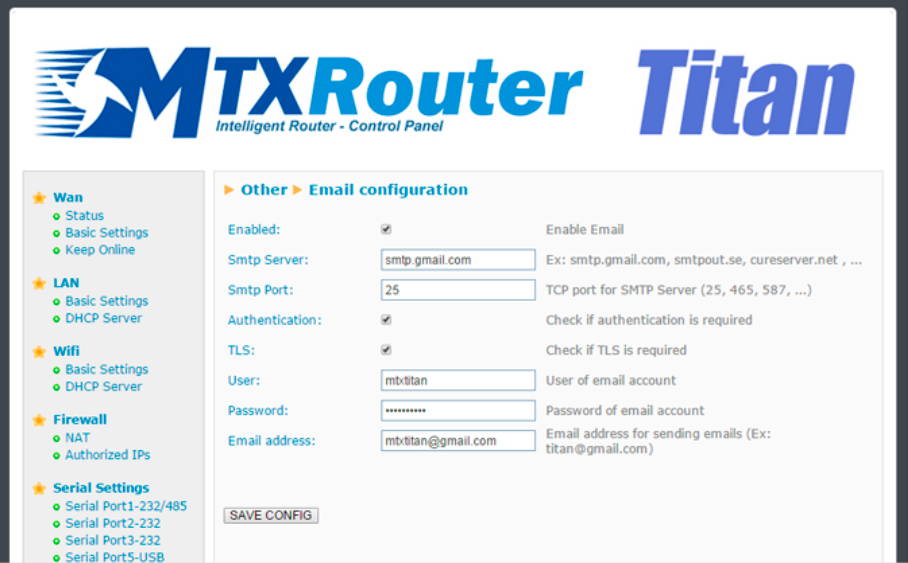
The router must be configured beforehand to be able to receive emails:
- Enabled: select this box if we wish to activate this option
- Smtp server: Indicate the address or DNS or the SMTP server (for example, smtp.gmail.com, smtpout.secureserver.net, etc.)
- Smtp Port: TCP port of the SMTP server
- Authentication: select this box if the SMTP server requires authentication (usually the case)
- TLS: select this box if the SMTP server requires TLS
- User: username of the sender’s email account
- Password: password of the sender’s email account
- Email address: sender’s email from which emails are sent
ADDITIONAL NOTES
- Once the configuration is complete, press the “SAVE CONFIG” button to save the changes. Remember that the router should be reset in order for the changes to take effect.
- If we use a Gmail SMTP server, we may have to activate certain configurations in our account in order to be able to send emails from an IOT device. To do this:
- 1. Activate the option: http://www.google.com/settings/security/lesssecureapps
- 2. Activate: http://www.google.com/accounts/DisplayUnlockCaptcha