
Aller au contenu principal
Suchen Sie etwas anderes?
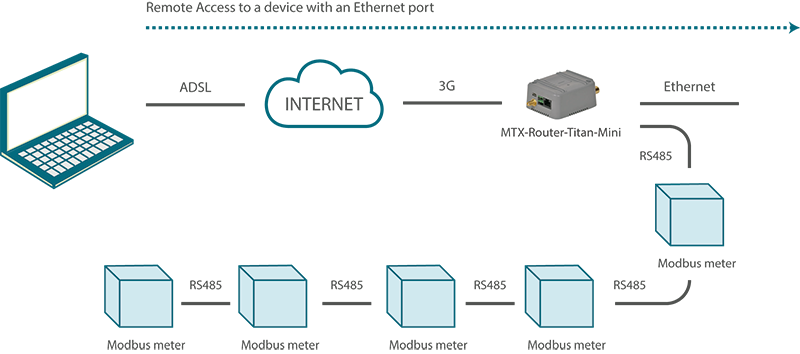
Details of the example scenario:
- We have five electric meters with Modbus RTU protocol. These meters have a series of variables/registers (for example, current consumption and average consumption) in its internal memory which should be periodically read and sent to a webserver.
- The router should request this data from the meter every 15 minutes. The registers to be read for the current consumption is register 20, and the average consumption is register 21.
- The router should send the value of registers to a webserver via HTTP GET using a JSON object after each reading, but it must be able to store up to 1000 readings in its flash memory in case of GPRS communication failure. These will be send upon restoration of the service. For each meter, a JSON string will be sent where the meter that is read will be indicated with an identifier (the Modbus address).
- Finally, the router should provide Internet access to a network analyzer with an Ethernet interface. The IP address of the analyzer is 192.168.1.1. The router must also map the TCP
port 8080 to the TCP port 80 to be able to remotely access it. - The router will use a SIM card with a dynamic IP address. Therefore, the IP address must be send each time it is changed to the webserver.
Solution: MTX-Router-Titan mini
Configuration example ready for use:
We can easily load the example from the router’s web configuration environment from the menu “Other>Backup/Examples”
Details:
- After the configuration is loaded in our router, we can access the router’s configuration with the default username and password: “admin” and “admin”, and the IP address“192.168.1.2”
- Check the configuration in the menus “Wan>Basic Settings”, “Lan>Basic Settings”, “Firewall>Nat”, “Serial Settings>Serial Port1”, “External Devices>Logger Configuration”,“External Devices>Generic Modbus RTU”, “Other>Time Servers”.
- If we need a webserver to carry out testing, write to us at iotsupport@mtxm2m.com and request a testing account in the test server site www.metering.es.
- Remember that in section 4.5.4 of this manual, we have the exact format of the data (JSON object) that is sent to the webserver when the Modbus devices are read.
- Remember that in section 4.6.2 of this manual, we have the exact format of the data (JSON object) that is sent to the webserver when the IP address is read.






