
Suchen Sie etwas anderes?
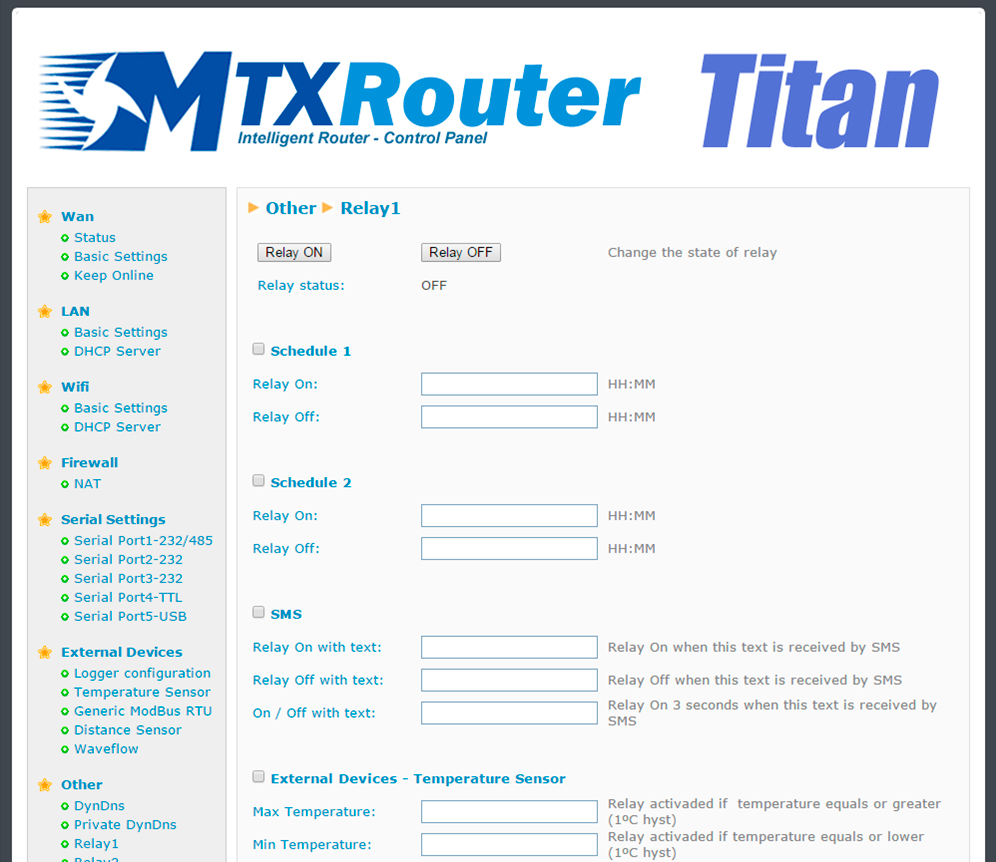
The MTX-Router-Titan II, MTX-Router-Titan and MTX-Router-Titan mini devices contain relays. These relays can be changed manually via a web console, Telnet, and SMS, as well as via temporization or according to a measured temperature or distance. The different configurations are applied to each relay independently; i.e. each relay can be configured in a different way.
- Schedule1: activate this option if we wish to use schedule 1
- Schedule1 > Relay on: indicates the time the relay for schedule 1 shall change
- Schedule1 > Relay off: indicates the time the relay for schedule 1 shall change
- Schedule2: activate this option if we wish to use schedule 2
- Schedule2 > Relay on: indicates the time the relay for schedule 2 shall change
- Schedule2 > Relay off: indicates the time the relay for schedule 2 shall change
- SMS: activate this option if we wish to change relays by sending an SMS
- SMS > Relay On with text: SMS text used to activate the relay
- SMS > Relay Off with text: SMS text used to deactivate the relay
- SMS > On / Off with text: SMS text used to activate the relay for 3 seconds. Used to carry out resets of external devices with just one SMS
- External Devices > Temperature Sensor: activate this option if we wish to change a relay according to the temperature of a sensor connected to the router’s serial port
- External Devices > Temperature Sensor > Max Temperature: maximum temperature, after which the relay is activated. The hysteresis is 1 degree
- External Devices > Temperature Sensor > Min Temperature: minimum temperature, after which the relay is activated. The hysteresis is 1 degree
- External Devices > Distance Sensor: activate this option if we wish to change a relay according to the distance of a Maxbotix sensor connected to the router’s serial port
- External Devices > Distance Sensor > Max Distance: maximum distance, after which the relay is activated. The hysteresis is 25cm
- External Devices > Distance Sensor > Min Distance: minimum distance, after which the relay is activated. The hysteresis is 25cm
- Jamming detection: activate this option if we want to change the relays when suspect jamming (GSM inhibitor) is detected
- Jamming > Seconds: how often the relay should be activated after suspect jamming is detected
- Astronomical clock: activate this option if we wish to change relays via an astronomical clock (the exact time of sunrise or sunset)
- Astronomical clock > Titan Latitude: in this field indicate the latitude of where the Titan is located for the astronomical clock calculations
- Astronomical clock > Titan Longitude: in this field indicate the longitud of where the Titan is located for the astronomical clock calculations
- Movement Detection: activate this option if we wish to change the relay when movement is detected (only available for Titan mini models)
- Movement Detection > Seconds: time (in seconds) during which the relay will be active after detecting movement
- GPS Area: activate this option if we wish to change the relay when the Titan router is located within a GPS area defined in the section “External Devices > GPS Receiver”
- BTC (Experimental): activate this option if we wish to change the relay when a bank transfer is detected in a specified Bitcoin address
- BTC > Address: incoming Bitcoin address
- BTC > Confirmations: number of necessary confirmations
- BTC > Price: number of Bitcoins per second that activate the relay. For example, if the price is 0.001, an incoming transfer of 0.060 BTC would activate the relay for 60 seconds
- Logger: activate this option if we wish to register and send the changes of a relay to our website via a JSON object
ADDITIONAL NOTES
- Once the configuration is finished, click “SAVE CONFIG” to save the changes. Remember that the router should be restarted for the changes to take effect.
- Sample format of the JSON string sent:
{“IMEI”:”354740050367237”,”TS”:”17/02/2014 19:02:46”,”TYPE”:”RELAY”,“P”:”1234”,”ID”:1,”VAL”:0,”WHY”,”AT”,WHYH”,””}
Where:
– IMEI: router’s ID number. Unique for each device
– TS: time stamp DD:MM:YYYY HH:MM:SS
– TYPE: type of string. In this case modbus
– P: logger’s ID field (External Devices > Logger configuration)
– ID: relay ID (0 or 1)
– WHY: reason why the relay has been changed
– “SCHE1” > relay changed because of Schedule 1
– “SCHE2” > relay changed because of Schedule 2
– “TEMP” > relay changed because of temperature
– “DIST” > relay changed because of distance
– “AT” > relay changed because of AT command
– “JAMM” > relay changed because of suspect jamming
– “ACCEL” > relay changed because of detected movement
– “GPS” > relay changed because of the GPS cell
– “ASTRO” > relay changed because of the astronomic relay
– “BITCOIN” > relay changed because of a received transfer
– WHYH: if the relay has been changed due to temperature or distance, indicate the temperature or distance that caused the change






