
Suchen Sie etwas anderes?
Table of Contents
System Time
Select time zone of your location. To use local time, leave the check mark in the box next to Use local time.

To adjust time by the system and refresh to get the time of the web, user can set to modify the time of the system. They can change to adjust time by manual to achieve adjust time by the system if the system fails to get NTP server.
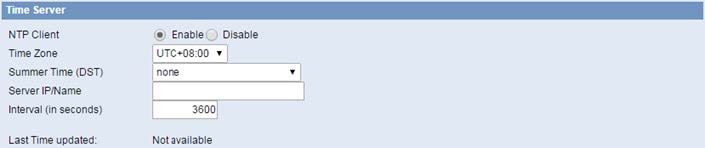
NTP Client: Get the system time from NTP server.
Time Zone: Time zone options.
Summer Time (DST): Set it depends on users’ location.
Server IP/Name: IP address of NTP server, up to 32 characters. If blank, the system will find a server by default.




Enter the “ethernet” or “modem” connection type:
For an ethernet configuration, make sure the IP parameters are compatible with server access according to the concentrator local network configuration. For an ethernet connection, the configuration must be compatible with the concentrator’s local network topology so that it can access the servers. This configuration is done from the “Networks” configuration page (see section 3.2.2.3: “Networks”).
For a modem connection, the modem configuration must be correct before a connection can be set up. This configuration is done from the “Modem” configuration page (see section 3.2.2.4: “Modem”).
The parameters for the servers to be configured are at least the following:
Therefore the following fields need to be configured: “Interface”, “Type”, “Server type”, “Address”, “Port”, “Login” and “Password”.
The other fields can be left at the default values subject to the directories having been properly created beforehand. See section 3.1.2: “Configuration files” for more details.

Wait. The concentrator will reboot using its factory configuration.




