
Suchen Sie etwas anderes?
Table of Contents
Advanced Router
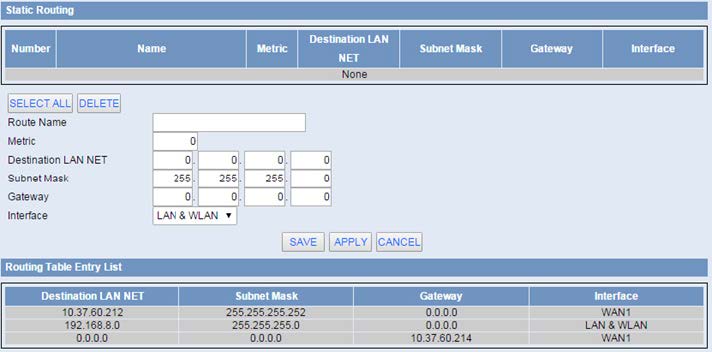
Route Name: Defined routing name by users, up to 25 characters.
Metric: 0-9999.
Destination LAN NET: The Destination IP Address is the address of the network or host to which users want to assign a static route.
Subnet Mask: The Subnet Mask determines which portion of an IP address is the network portion, and which portion is the host portion.
Gateway: IP address of the gateway device that allows for contact between the router and the network or host.
Interface: Indicate users whether the Destination IP Address is on the LAN & WLAN (internal wired and wireless networks), the WAN (Internet), or Loopback (a dummy network in which one PC acts like a network, necessary for certain software programs).



Enter the “ethernet” or “modem” connection type:
For an ethernet configuration, make sure the IP parameters are compatible with server access according to the concentrator local network configuration. For an ethernet connection, the configuration must be compatible with the concentrator’s local network topology so that it can access the servers. This configuration is done from the “Networks” configuration page (see section 3.2.2.3: “Networks”).
For a modem connection, the modem configuration must be correct before a connection can be set up. This configuration is done from the “Modem” configuration page (see section 3.2.2.4: “Modem”).
The parameters for the servers to be configured are at least the following:
Therefore the following fields need to be configured: “Interface”, “Type”, “Server type”, “Address”, “Port”, “Login” and “Password”.
The other fields can be left at the default values subject to the directories having been properly created beforehand. See section 3.1.2: “Configuration files” for more details.

Wait. The concentrator will reboot using its factory configuration.





