Suchen Sie etwas anderes?
Table of Contents
Packet Filter
This page can create firewall rules to protect your network from malicious attacks on Internet network viruses.
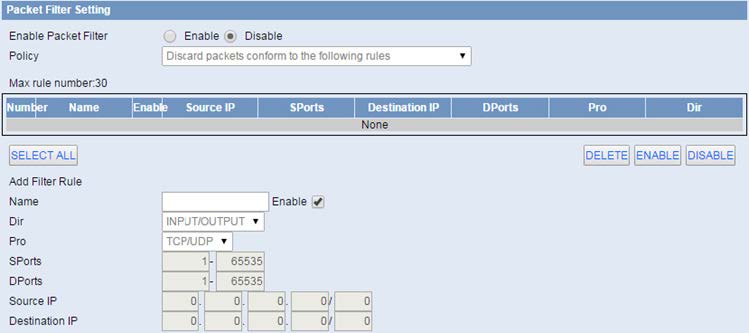
Packet filter: Enable or disable packet filtering.
Policy: Select the action of the data package that does not conform to the setting rules.
Accept only the data packets conform to the following rules: Only access to match the address.
Discard packets conform to the following rules: Only receive the network address that complies with the custom rules, and drop all other addresses.
Note: Add filter matching rules. Source port, destination port, source address, destination address must be filled in at least one item.
INPUT: Data packets from WAN port to LAN port.
OUTPUT: Data packets from the LAN port to the WAN port.
Pro: Protocol type for a data packet.
Sport: The source port of the data package.
Dport: Port of destination.
Source IP: The source IP address of the data package.
Destination IP: Destination IP address.


Geben Sie den Verbindungsmodus „ethernet“ oder „modem“ ein:
Stellen Sie bei einer Ethernet-Konfiguration sicher, dass die IP-Parameter mit dem Serverzugriff entsprechend der lokalen Netzwerkkonfiguration des Hubs kompatibel sind. Bei einer Ethernet-Verbindung muss die Konfiguration mit der lokalen Netztopologie des Hubs kompatibel sein, damit dieser auf die Server zugreifen kann. Diese Konfiguration erfolgt über die Konfigurationsseite „Networks“ (siehe Kapitel 3.2.2.3: „Netzwerke (Networks)“).
Bei einer Modemverbindung muss das Modem korrekt konfiguriert sein, bevor eine Verbindung hergestellt werden kann. Diese Konfiguration erfolgt auf der Konfigurationsseite „Modem“ (siehe Kapitel 3.2.2.4: „Modem“).
Die minimal zu konfigurierenden Serverparameter sind folgende:
Diese Felder müssen konfiguriert werden: „Interface“, „Type“, „Server type“, „Address“, „Port“, „Login“ und „Password“.
In den übrigen Feldern können die Standardwerte beibehalten werden, solange die Verzeichnisse zuvor korrekt angelegt wurden. Weitere Einzelheiten siehe Kapitel 3.1.2: „Konfigurationsdateien“.

Warten Sie. Der Hub startet nach ein paar Augenblicken mit der Werkseinstellung neu.