Zum Hauptinhalt springen
Suchen Sie etwas anderes?
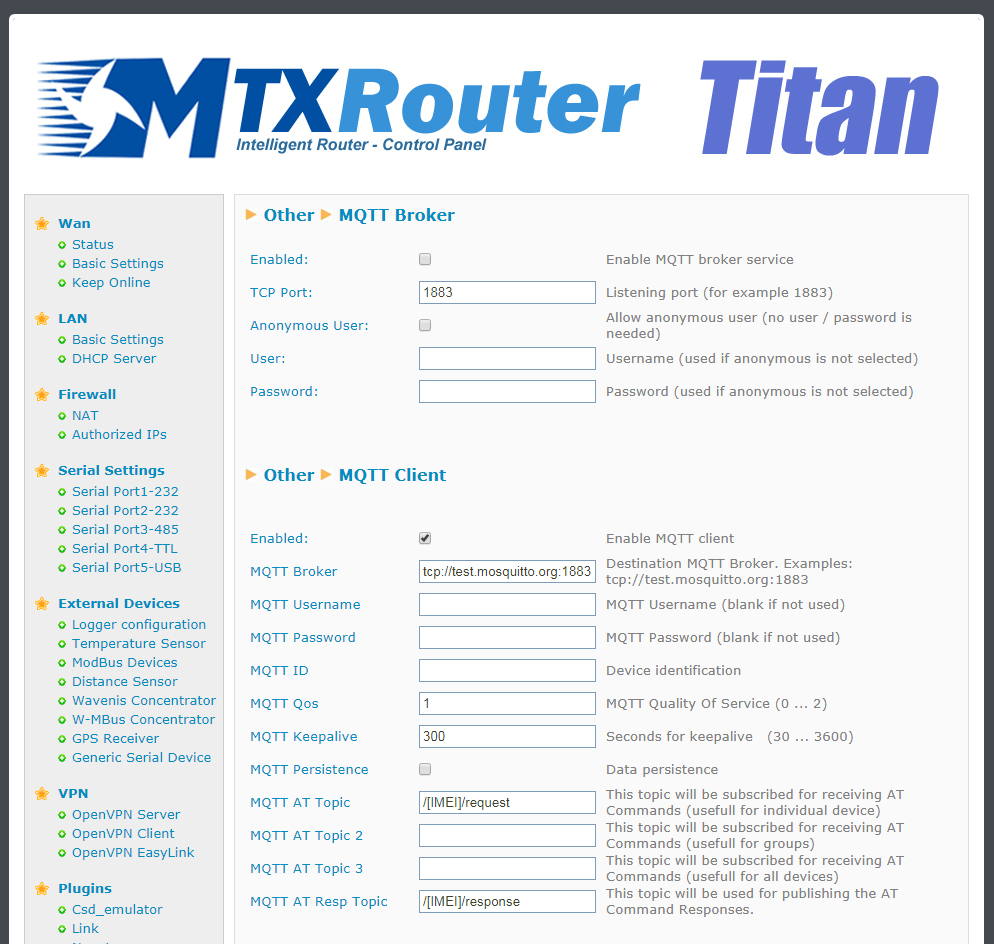
Titan routers can work as basic MQTT broker or as MQTT client. Configuring the Titan router as MQTT client it can send the data gathered in the Logger (sensor data, modbus equipment, …) via MQTT. This section should be properly configured if we select send via MQTT in the Logger section.
Other: MQTT broker
- Enabled:
- Anonym user:
- User:
- Password:
Other: MQTT client:
- Enabled: select to enable the MQTT client service
- Username: leave blank if we are not using it
- Password: leave blank if we are not using it
- ID: device identification field
- QoS: quality of service (0, 1, 2)
- KeepAlive: in seconds (300 recommended)
- Persistence: select in case we want data to be persistent
- AT Topic: Titan router topic 1. AT commands sent to this topic will be executed in the router
- AT Topic 2: Titan router topic 2. AT commands sent to this topic will be executed in the router
- AT Topic 3: Titan router topic 3. AT commands sent to this topic will be executed in the router
- AT Topic Rest: MQTT ansours to AT commands received by the Titan router will be sent to this topic also via MQTT
ADDITIONAL NOTES
- Once configured click on the “SAVE CONFIG” button to save changes. Restart the router so changes apply
- Note we can enter the text [IMEI] instead of the IMEI number. That is, if the IMEI is 012345678912345, we could either enter the topic /012345678912345/TEST or /[IMEI]/TEST
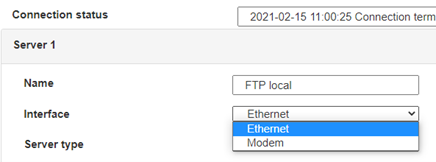
 Geben Sie den Verbindungsmodus „ethernet“ oder „modem“ ein:
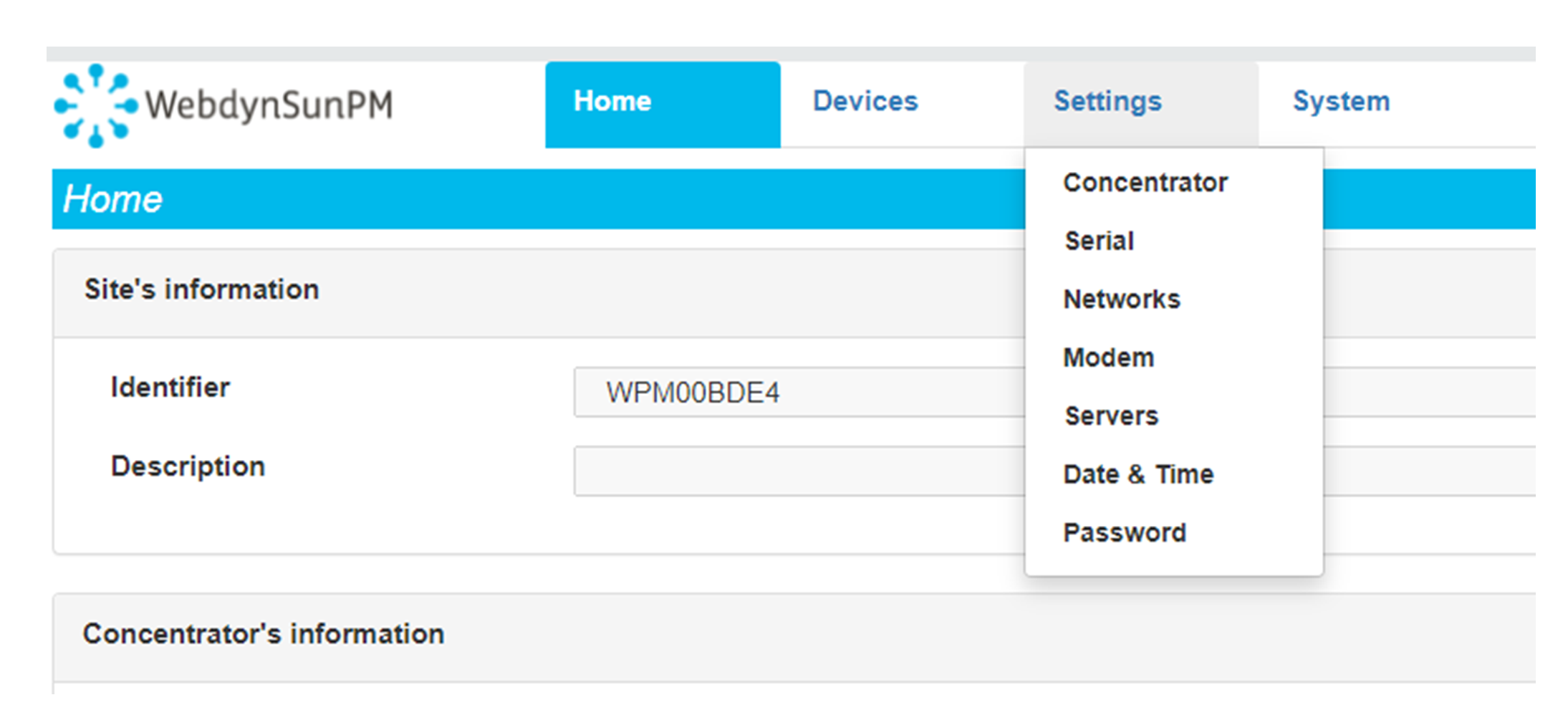
 Stellen Sie bei einer Ethernet-Konfiguration sicher, dass die IP-Parameter mit dem Serverzugriff entsprechend der lokalen Netzwerkkonfiguration des Hubs kompatibel sind. Bei einer Ethernet-Verbindung muss die Konfiguration mit der lokalen Netztopologie des Hubs kompatibel sein, damit dieser auf die Server zugreifen kann. Diese Konfiguration erfolgt über die Konfigurationsseite „Networks“ (siehe Kapitel 3.2.2.3: „Netzwerke (Networks)“).
Bei einer Modemverbindung muss das Modem korrekt konfiguriert sein, bevor eine Verbindung hergestellt werden kann. Diese Konfiguration erfolgt auf der Konfigurationsseite „Modem“ (siehe Kapitel 3.2.2.4: „Modem“).
Die minimal zu konfigurierenden Serverparameter sind folgende:
Stellen Sie bei einer Ethernet-Konfiguration sicher, dass die IP-Parameter mit dem Serverzugriff entsprechend der lokalen Netzwerkkonfiguration des Hubs kompatibel sind. Bei einer Ethernet-Verbindung muss die Konfiguration mit der lokalen Netztopologie des Hubs kompatibel sein, damit dieser auf die Server zugreifen kann. Diese Konfiguration erfolgt über die Konfigurationsseite „Networks“ (siehe Kapitel 3.2.2.3: „Netzwerke (Networks)“).
Bei einer Modemverbindung muss das Modem korrekt konfiguriert sein, bevor eine Verbindung hergestellt werden kann. Diese Konfiguration erfolgt auf der Konfigurationsseite „Modem“ (siehe Kapitel 3.2.2.4: „Modem“).
Die minimal zu konfigurierenden Serverparameter sind folgende:
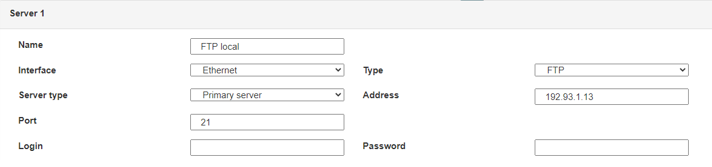 Diese Felder müssen konfiguriert werden: „Interface“, „Type“, „Server type“, „Address“, „Port“, „Login“ und „Password“.
In den übrigen Feldern können die Standardwerte beibehalten werden, solange die Verzeichnisse zuvor korrekt angelegt wurden. Weitere Einzelheiten siehe Kapitel 3.1.2: „Konfigurationsdateien“.
Diese Felder müssen konfiguriert werden: „Interface“, „Type“, „Server type“, „Address“, „Port“, „Login“ und „Password“.
In den übrigen Feldern können die Standardwerte beibehalten werden, solange die Verzeichnisse zuvor korrekt angelegt wurden. Weitere Einzelheiten siehe Kapitel 3.1.2: „Konfigurationsdateien“.




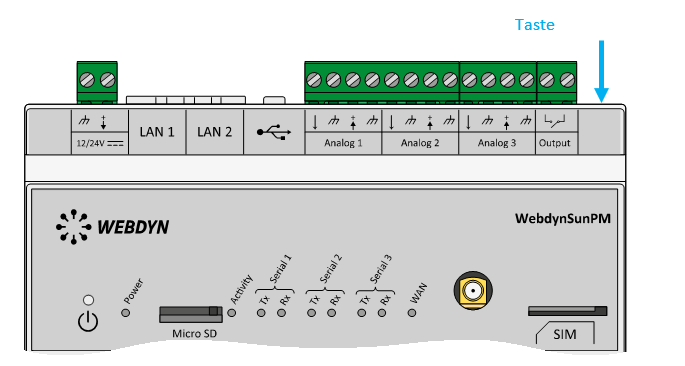 Warten Sie. Der Hub startet nach ein paar Augenblicken mit der Werkseinstellung neu.