Suchen Sie etwas anderes?
Table of Contents
Port Triggering
Port Triggering allows you to do port forwarding without setting a fixed PC. By setting Port Triggering rules, you can allow inbound traffic to arrive at a specific LAN host, using ports different than those used for the outbound traffic. This is called port triggering since the outbound traffic triggers to which ports inbound traffic is directed.

Application: Enter the name of the application in the field provided.
Triggered Port Range: Enter the number of the first and the last port of the range, which should be triggered. If a PC sends outbound traffic from those ports, incoming traffic on the Forwarded Range will be forwarded to that PC.
Forwarded Port Range: Enter the number of the first and the last port of the range, which should be forwarded from the Internet to the PC, which has triggered the Triggered Range.
Enable :Click the Enable check box to enable port triggering for the application.


Enter the “ethernet” or “modem” connection type:
For an ethernet configuration, make sure the IP parameters are compatible with server access according to the concentrator local network configuration. For an ethernet connection, the configuration must be compatible with the concentrator’s local network topology so that it can access the servers. This configuration is done from the “Networks” configuration page (see section 3.2.2.3: “Networks”).
For a modem connection, the modem configuration must be correct before a connection can be set up. This configuration is done from the “Modem” configuration page (see section 3.2.2.4: “Modem”).
The parameters for the servers to be configured are at least the following:
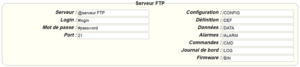
Therefore the following fields need to be configured: “Interface”, “Type”, “Server type”, “Address”, “Port”, “Login” and “Password”.
The other fields can be left at the default values subject to the directories having been properly created beforehand. See section 3.1.2: “Configuration files” for more details.

Wait. The concentrator will reboot using its factory configuration.