
Skip to main content
Suchen Sie etwas anderes?
Scenario details:
- 2 analog sensors need to be monitored, one 0-10V and the other 4-20mA
- If the 0-10V sensor registers a voltage greater than 8V or less than 2V, an alert voice call must be made to a series of telephone numbers
- If the 4-20mA sensor registers a current greater than 16mA or less than 8mA, an alert voice call must be made to a series of telephone numbers
- The phone numbers that will receive the alert calls are +34666123456, +34666123457 and +346661234568
- To avoid sending a high number of calls (when the measured value is just within the alarm limits), a hysteresis of 100mV must be configured for the 0-10V sensor and 0.5mA for the 4-20mA sensor.
- A timeout of 5 minutes per input must also be established, that is, no more than 1 call will be made in a 5-minute window due to the activation of a certain analog input
Solution: MTX-Tunnel firmware + MTX-IOT-S [4-N]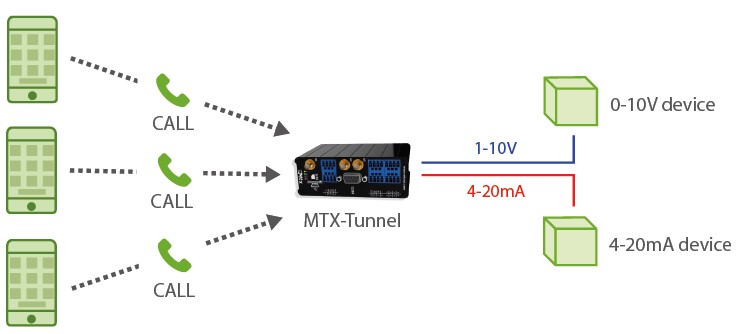
Configuration example (config.txt file) for the indicated scenario:
| Configuration | Observations |
| MTX_pin: 0000 MTX_model: 199802407 MTX_mode: none SMS_allPhones: off SMS_validPhone1: +34666123456 SMS_validPhone2: +34666123457 SMS_validPhone3: +34666123458 ALARM_smsNumber1: +34666123456 ALARM_smsNumber2: +34666123457 ALARM_smsNumber3: +34666123458 ADC_mode0: voltage ADC_config0: ADC_config0: call;2000;8000;100;300 ADC_mode1: current ADC_config1: ADC_config1: call;8000;16000;500;300 |
PIN if it has one Device model Gateways used Phone numbers Phone number 1 Phone number 2 Phone number 3 Phone number 1 Phone number 2 Phone number 3 ADC0 configured as voltage – ADC1 configured as current – |
Details:
- The configuration of the inputs as “call; 1; 300” indicates the following:
“call” > The input is configured to send alarm by voice call (the voice call will be made, but will not play any audio on the other end of the phone)
“1” > The 2 indicates that the digital input is configured to make the voice call by activation of the input (when it closes taking it to ground)
“300” > Indicates the timeout of the digital input, in seconds. This means that, even if there are multiple changes in the digital input, there will never be more than 1 call in a 5-minute window (5 minutes = 300 seconds)






