Suchen Sie etwas anderes?
Table of Contents
Position
This menu is only valid for GPS versions.

Configure the output port to output positioning data or differential data.
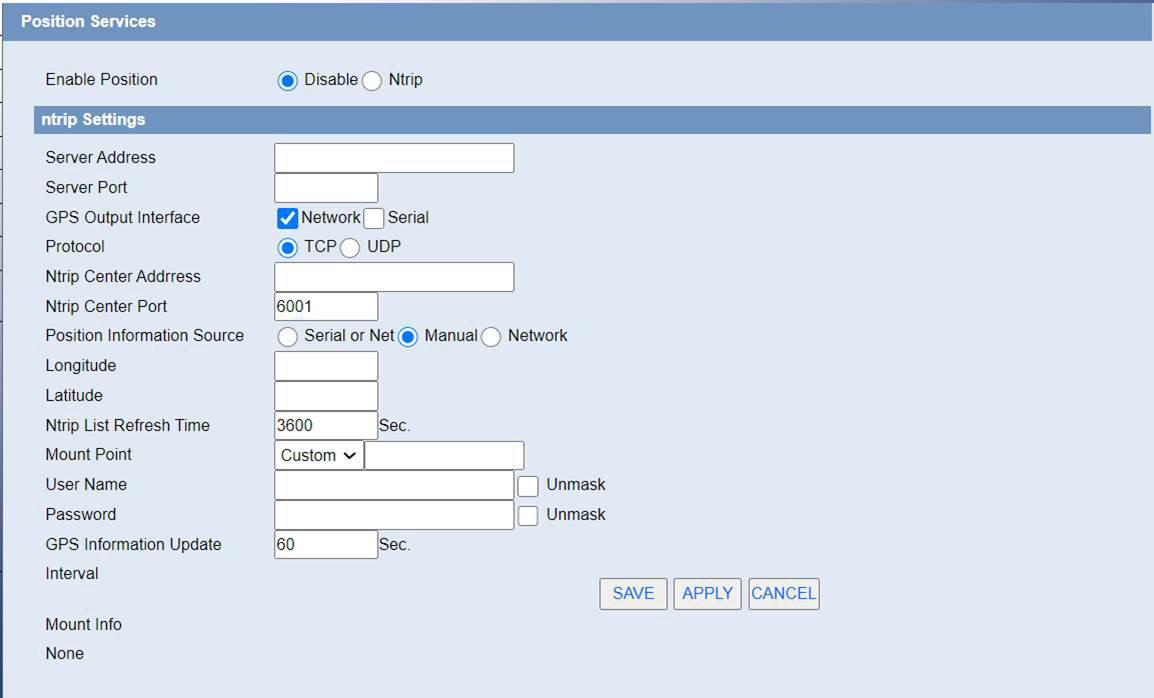
GPS Output Interface: Choose the way of data output
Protocol, GPS Center Address, GPS Center Port: Network Output Configuration
GPS Information Contents: After checking, the output location information will contain the corresponding type data.
ID of device: Users can customize it to identify which device it is.
GPS Information Update: Time interval of data output.
Baudrate, Databit, Stopbit, Parity, Flow Control: Serial port output configuration.

Server Address,Server Port: IP and Port Number of Ntrip Service Provider
Position Information Source: In automatic mode, GGA information is read regularly from GPS module. Serial port, get GGA data from serial port.Manually, pack the latitude and longitude set below into GGA data format. Network, Getting GGA Data from Network
Ntrip List Refresh Time: Seeing the name of a thing one thinks of its function
Mount Point: The name of the mountpoint provided by the Ntrip service provider
User Name: The account provided by Ntrip service provider
Password: Ntrip Service Provides Account Password
Mount Info: All mountable point information provided by the operator will be displayed in this column.