Zum Hauptinhalt springen
Suchen Sie etwas anderes?
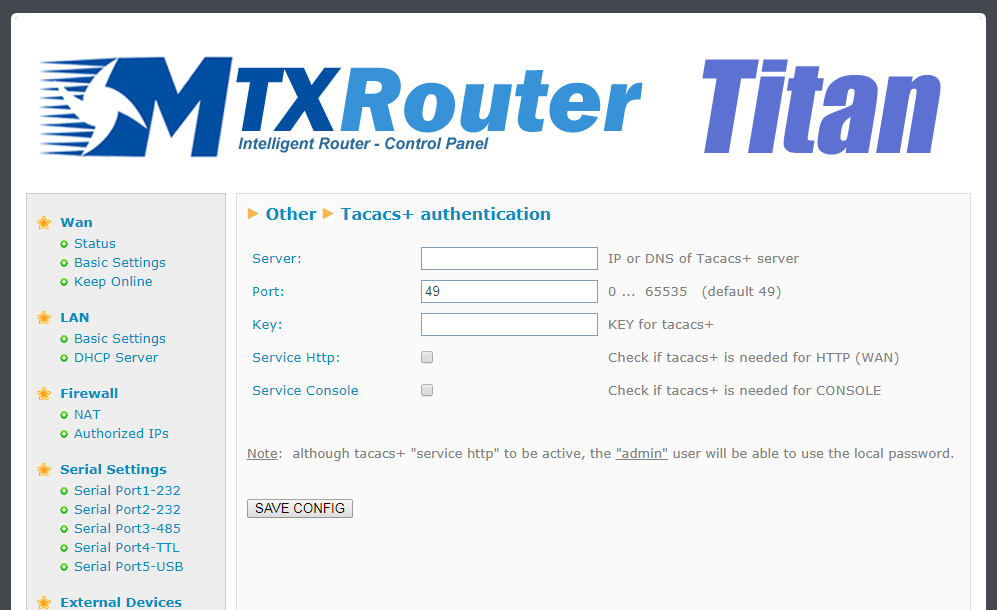
If an external Tacacs+ server is needed for the authentication of the HTTP and Telnet services, we need to configure in this section.
- Server: Tacacs+ server IP address or DNS
- Port: Tacacs+ tap port (default 49)
- Key: encryption password
- Service http: activate this box in case we want the access to the Titan router via HTTP to use the Tacacs+ authentication service
- Service console: activate this box in case we want the access to the Titan router via Telnet (remote console) to use Tacacs+ authentication
ADDITIONAL NOTES
- Once configured click on the “SAVE CONFIG” button to save changes. Restart the router so changes apply
- Note the Titan router will allow us to use the username and password assigned to the user “admin” locally, so if the router does not have Internet connectivity (operator change, etc.) it can have a way to enter the router. Save the “admin” local password securely

Geben Sie den Verbindungsmodus „ethernet“ oder „modem“ ein:
Stellen Sie bei einer Ethernet-Konfiguration sicher, dass die IP-Parameter mit dem Serverzugriff entsprechend der lokalen Netzwerkkonfiguration des Hubs kompatibel sind. Bei einer Ethernet-Verbindung muss die Konfiguration mit der lokalen Netztopologie des Hubs kompatibel sein, damit dieser auf die Server zugreifen kann. Diese Konfiguration erfolgt über die Konfigurationsseite „Networks“ (siehe Kapitel 3.2.2.3: „Netzwerke (Networks)“).
Bei einer Modemverbindung muss das Modem korrekt konfiguriert sein, bevor eine Verbindung hergestellt werden kann. Diese Konfiguration erfolgt auf der Konfigurationsseite „Modem“ (siehe Kapitel 3.2.2.4: „Modem“).
Die minimal zu konfigurierenden Serverparameter sind folgende:
Diese Felder müssen konfiguriert werden: „Interface“, „Type“, „Server type“, „Address“, „Port“, „Login“ und „Password“.
In den übrigen Feldern können die Standardwerte beibehalten werden, solange die Verzeichnisse zuvor korrekt angelegt wurden. Weitere Einzelheiten siehe Kapitel 3.1.2: „Konfigurationsdateien“.

Warten Sie. Der Hub startet nach ein paar Augenblicken mit der Werkseinstellung neu.