Tunnel – Periodic monitoring via 4G/3G/2G of a 4-20mA sensor with ultralow consumption modem. Activating sensor supply via relay. Sending to broker MQTT
Scenario details: We want to monitor a 4-20mA sensor with a 4G/3G/2G modem The modem will be powered by batteries, so it must remain in ultra-low consumption mode (~10 uAmper), waking up only to make the reading and send the data via 4G/3G/2G (depending on the modem model) to an MQTT broker Every 24 hours, […]
Tunnel – Sending an SMS alarm when the digital input is activated with ultra low power consumption
Scenario details: Some small cages have been placed on a hill to monitor a wild animal. An SMS alarm is sent when the cage door opens (connected to a Digital Input in a MTX) Modems are in a remote place where only batteries can be used. This means that it only consumes 2 μA. When […]
Tunnel – Sending GPS positions in real time to server using TCP socket or HTTP
Scenario details: Some port facilities dispose of vehicles that lack being equipped with a real-ime GPS locating system Being a real-time system it does not need to save GPS locations history to the internal datalogger of the device in order to be sent when it later (as it is done in a conventional fleet control […]
Tunnel – 4G-Serial transparent gateway with SNMP service activated
Scenario details: There are a few hundreds of devices with RS232 port ( configurated at a 115200,8,N,1 and flow control HW). We need to monitor them from a Computer with Internet connection It should be possible to access RS232 devices at any moment, therefore the modem connected to the serial port of the device should […]
Tunnel – Use of MTX-Tunnel as a datalogger. Sending customized and periodic serial data for proprietary protocols
Scenario details: We have a device with an RS232 serial port. Internal registers need to be read and sent to a Web platform every 10 minutes In order to read the records, a proprietary protocol is used. This means that certain bytes of data (proprietary protocol) must be sent via the device’s serial port for […]
Tunnel – Use of MTX-Tunnel as a serial datalogger
Scenario details: We have a device that sends bytes of data, which correspond to a sensor’s readings, via its serial port every 10 seconds. The data will be a maximum of 256 bytes Taking readings every 10 seconds can be excessive for the application. MTX must only take one reading every minute (therefore eliminating 5 […]
Tunnel – Use of MTX-Tunnel as 2G/3G/4G-RS232 gateway and for time synchronization of an external device connected to the modem
Scenario details: A PLC system needs 2G/3G/4G-RS232 gateway to send data to a central server and to receive setting orders The modem must remain in listen mode, waiting for a server connection, in the TCP 20010 port. On the other hand, the PLC can send alarm messages to the server. In the event of the […]
Tunnel – Conversion of a GSM communications system into an IP (2G/3G/4G) communication system
Scenario details: We have a series of old PLCs that use a GSM modem to make and receive conventional GSM calls We intend to replace the old GSM based communication system with one using 4G communications, modifying the previous system as little as possible. That is, without modifying the PLC software and modifying the server […]
Tunnel – A GPRS-serial gateway, broadcasting data that begins with a chosen header to a server
Scenario details: Although MTX-Tunnel allows independent readings from ModBus devices to be made, we consider a PLC being the master in a MODBUS communication with a network of meters The PLC only allows the use of the MODBUS protocol and we want to be able to send some data from the meters to a central […]
Tunnel – Advanced tunnel 4G-serial – Receiving and sending data to servers with UDP data packets
Scenario details: We have a device with an RS232port (9600,8,N,1 and without flow control HW). This device, when an alarm is created, sends a data packet that, for security reasons, must be sent to 3 different servers. The communication with the servers must be made using UDP data packets. The different server addresses are: 200.1.1.1, […]
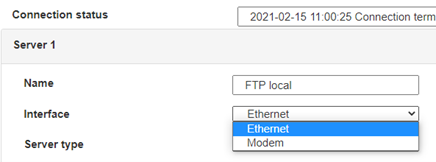
 Enter the “ethernet” or “modem” connection type:
 For an ethernet configuration, make sure the IP parameters are compatible with server access according to the concentrator local network configuration. For an ethernet connection, the configuration must be compatible with the concentrator’s local network topology so that it can access the servers. This configuration is done from the “Networks” configuration page (see section 3.2.2.3: “Networks”).
For a modem connection, the modem configuration must be correct before a connection can be set up. This configuration is done from the “Modem” configuration page (see section 3.2.2.4: “Modem”).
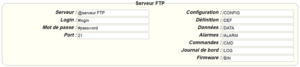
The parameters for the servers to be configured are at least the following:
For an ethernet configuration, make sure the IP parameters are compatible with server access according to the concentrator local network configuration. For an ethernet connection, the configuration must be compatible with the concentrator’s local network topology so that it can access the servers. This configuration is done from the “Networks” configuration page (see section 3.2.2.3: “Networks”).
For a modem connection, the modem configuration must be correct before a connection can be set up. This configuration is done from the “Modem” configuration page (see section 3.2.2.4: “Modem”).
The parameters for the servers to be configured are at least the following:
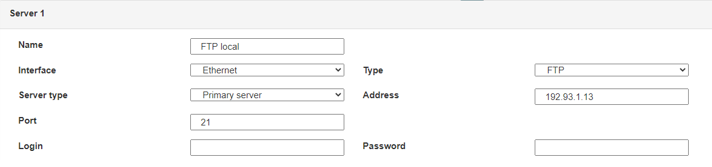 Therefore the following fields need to be configured: “Interface”, “Type”, “Server type”, “Address”, “Port”, “Login” and “Password”.
The other fields can be left at the default values subject to the directories having been properly created beforehand. See section 3.1.2: “Configuration files” for more details.
Therefore the following fields need to be configured: “Interface”, “Type”, “Server type”, “Address”, “Port”, “Login” and “Password”.
The other fields can be left at the default values subject to the directories having been properly created beforehand. See section 3.1.2: “Configuration files” for more details.




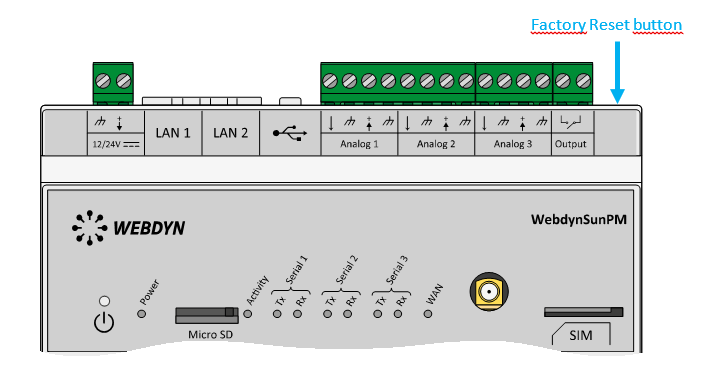 Wait. The concentrator will reboot using its factory configuration.