Tunnel – Periodically obtaining readings from 5 electronic meters and sending them to a webserver using the ModBus RTU protocol
Scenario details: We have 5 electric meters with ModBus RTU protocol. These meters have a series of readings in their internal memory (e.g. cumulative consumption and average consumption) which should be read and sent to a Web server periodically Therefore every 15 minutes the MTX-Tunnel has to question the 5 meters to read the records […]
Tunnel – PLC Modbus RTU periodically registers readings, sends them as a JSON object to webserver
Scenario details: There is a Modbus RTU PLC. This PLC records some variables such as temperature, pulses, etc. in their register memory table from external devices connected to it. We need to read them and send them to a WebServer MTXTunnel will connect every 15 minutes to the PLC serial port. The number for storing […]
Tunnel – Using API to send SMS to external PLC devices connected to COM1 at the same time that the 4G-RS232 tunnel is active
Scenario details: From the central offices we need to access periodically via 4G the PLC serial port to send instructions and collect results. To access it we’ll use MTX-Tunnel as a 4G-RS232 gateway MTX-Tunnel must always have the IP session established to be able to access the PLC device at any moment. It will use […]
Tunnel – Using API to switch a relay from a third-party or end user webpage
Scenario details: We want to program a web page and switch 1 relay, to switch a lamp on/off. For that we will use MTX-4G-JAVA-IOT-STD-RL with internal relay An end user will open the web page and will switch the external lamps on/off with the click of a mouse. MTX-Tunnel has to communicate the webpage data […]
Tunnel – Using API to send data coming from a 3rd party webpage form and output serial port MTX-Tunnel
Scenario details: We have a special display/LCD with a serial RS232 input. The data present in the RS232 port is shown in the display We need to remotely control the LCD using the MTX-Tunnel GPRS-Serial tunnel We can control the LCD in several ways. We could develop a code for the server PC and use […]
Tunnel – API used for reading MTX-Tunnel GPIOs and ADCs from 3rd party site
Scenario details: Monitor the modem’s inputs remotely and present values in a 3rd-party web page MTX-Tunnel has to be permanently connected to GPRS in server mode, waiting for HTTP GET connections coming from this web page The end customer web page will be ASP language programmed and will collect all of the values and display them Solution: MTX-Tunnel […]
Tunnel – IP-RS232/RS485 Tunnel using ULP consumption modem. Programmed timing activation
Scenario details: We need to remotely read a water counter once a day at 22.00. An ultra low power modem is needed because they will be powered by external batteries The modem must be in ultra low power mode (10 μA) until 22.00 At this time, 22.00, the modem wakes up and automatically connects to […]
Tunnel – Timing alarm activation of GPRS-RS232 tunnel using MTX-ULP modem
Scenario details: We need to collect daily data of meteorological logger equipment with an RS232 port using GPRS. We need to use a low power consumption modem as the main battery cannot be changed The GPRS modem has to be in low power mode (2 μA) for 24 hours Then, after 24 hours, the modem has to […]
Tunnel – Sending digital and analog input value telemetry by 2G/3G/4G according to an event (not periodically) using ultra low power modem. Sending to MQTT broker
Scenario details: Some digital and analog inputs need to be remotely monitored via GPRS MTX-65-ULP is powered by external batteries and remains in Low Power Mode (2 uA) until the level of digital inputs change (tamper) When there is a change in tamper digital input level, the modem wakes up and changes to normal operation mode to […]
Tunnel – Periodic sending of digital and analog input value telemetry by 2G/3G/4G using ULP modem. Sending to MQTT broker
Scenario details: Some digital and analog inputs need to be remotely monitored via 2G/3G/4G The modem is in a remote location and needs to be battery powered, so the modem has to be in ultra low power mode (10 uA) and only wake up to send input values using 2G/3G/4G The wake up is scheduled […]
 Enter the “ethernet” or “modem” connection type:
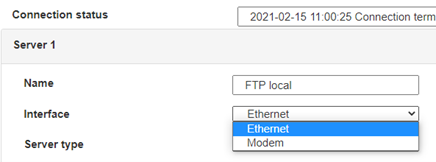 For an ethernet configuration, make sure the IP parameters are compatible with server access according to the concentrator local network configuration. For an ethernet connection, the configuration must be compatible with the concentrator’s local network topology so that it can access the servers. This configuration is done from the “Networks” configuration page (see section 3.2.2.3: “Networks”).
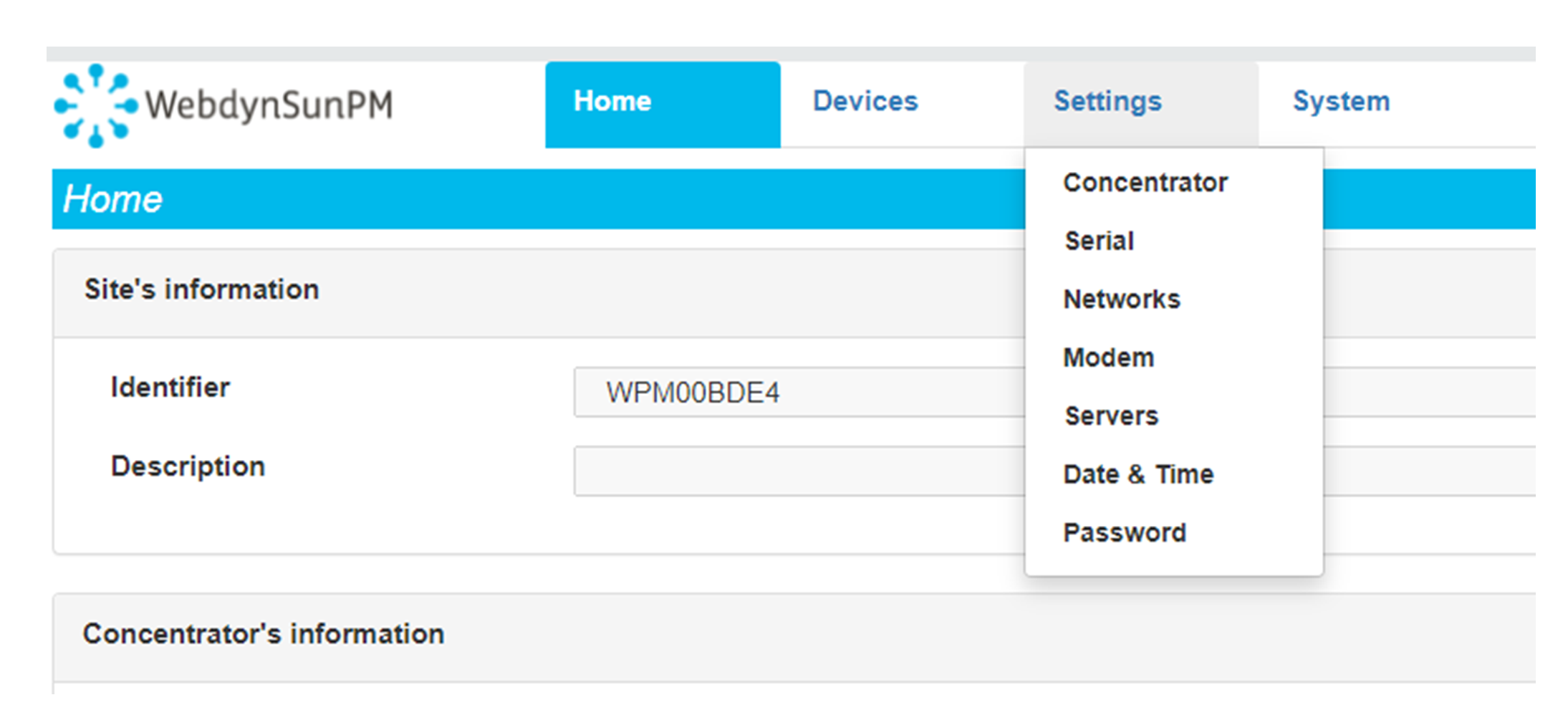
For a modem connection, the modem configuration must be correct before a connection can be set up. This configuration is done from the “Modem” configuration page (see section 3.2.2.4: “Modem”).
The parameters for the servers to be configured are at least the following:
For an ethernet configuration, make sure the IP parameters are compatible with server access according to the concentrator local network configuration. For an ethernet connection, the configuration must be compatible with the concentrator’s local network topology so that it can access the servers. This configuration is done from the “Networks” configuration page (see section 3.2.2.3: “Networks”).
For a modem connection, the modem configuration must be correct before a connection can be set up. This configuration is done from the “Modem” configuration page (see section 3.2.2.4: “Modem”).
The parameters for the servers to be configured are at least the following:
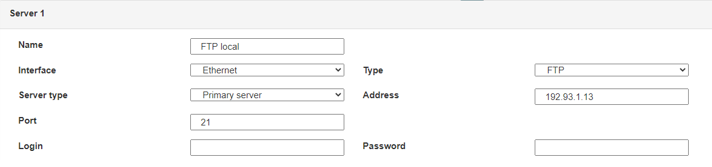 Therefore the following fields need to be configured: “Interface”, “Type”, “Server type”, “Address”, “Port”, “Login” and “Password”.
The other fields can be left at the default values subject to the directories having been properly created beforehand. See section 3.1.2: “Configuration files” for more details.
Therefore the following fields need to be configured: “Interface”, “Type”, “Server type”, “Address”, “Port”, “Login” and “Password”.
The other fields can be left at the default values subject to the directories having been properly created beforehand. See section 3.1.2: “Configuration files” for more details.




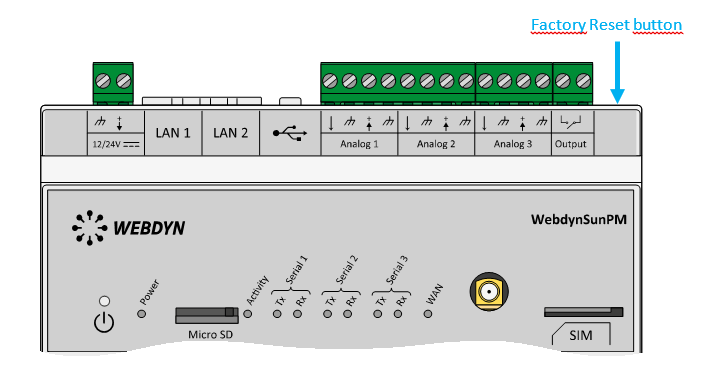 Wait. The concentrator will reboot using its factory configuration.