
Suchen Sie etwas anderes?
With OpenVPN EasyLink it is possible to establish an OpenVPN communication in a very simple and comfortable way in situations where it is necessary to perform a specific maintenance of a remote equipment.
In addition to its simplicity, it is very useful because it works regardless of whether the SIM cards used in remote Titan routers provide a public or private IP address. This way we do not need to worry about the GSM operator to use. What SIM cards should used is the SMS messaging service enabled. The reason is that, to start the EasyLink connection, the router acting as server will send an SMS to the remote router.
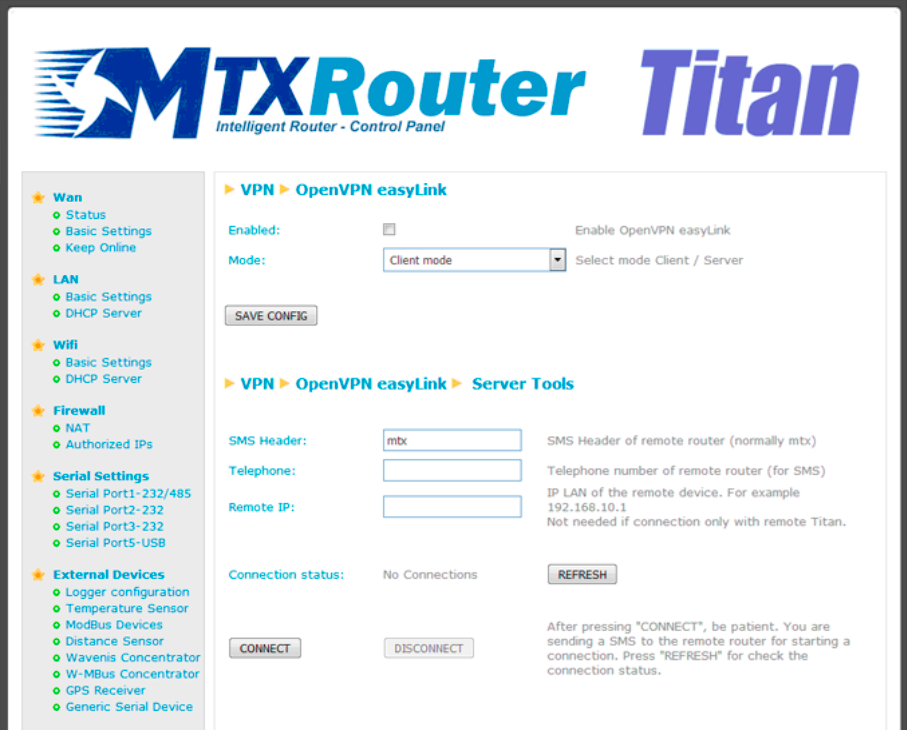
- Enabled: check this box if we want to enable the OpenVPN EasyLink service
- Mode: we must set “Client mode” on the remote Titan routers, that is, they will be connected to the devices we want to manage. “Server mode” must be selected on the local Titan router which, connected to our PC, will use to establish the OpenVPN connection
- SMS header: here we must specify the SMS header that we configured on remote Titan routers, in the “Other -> SMS Control” configuration section
- Telephone: the SIM telephone number of the remote Titan router with which it is intended to communicate
- Remote IP: LAN IP of the remote device that we want to control
It has an application note: AN17-Router-Titan-OpenVPN-EasyLink.pdf where we will explain in a very detailed way how to use this feature.
ADDITIONAL NOTES
- Once the configuration is finished press the “SAVE CONFIG” button to save the changes. Remember to restart our router for the new changes to take effect.






